教程
本教程介绍文档对象模型(DOM)API。
如 概览 所示,你可以将 JSON 解析为 DOM,然后轻松地查询和修改 DOM,最后将其转换回 JSON。
Value 与 Document
每个 JSON 值存储为 Value 类,而 Document 类表示整个 DOM,存储 DOM 树的根 Value。Merak 的所有公共类型和函数都在 merak::json 命名空间中。
查询值
本节使用 example/tutorial/tutorial.cpp 中的代码示例。
假设我们将 JSON 存储在 C 风格字符串中(const char* json):
{
    "hello": "world",
    "t": true ,
    "f": false,
    "n": null,
    "i": 123,
    "pi": 3.1416,
    "a": [1, 2, 3, 4]
}
将其解析为 Document:
#include "merak/json/document.h"

using namespace merak::json;

// ...
Document document;
document.Parse(json);
现在 JSON 已解析到 document 中,形成一个 DOM 树:
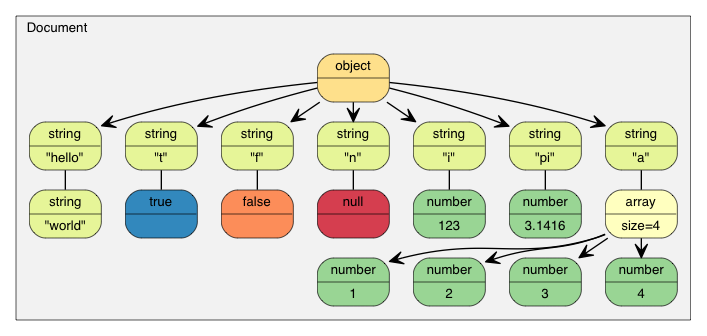
根据 RFC 7159 的更新,有效 JSON 文件的根可以是任意类型的 JSON 值(早期 RFC 4627 仅允许 Object 或 Array 作为根)。在上例中,根是一个 Object:
assert(document.IsObject());
检查根 Object 是否包含 "hello" 成员。由于 Value 可以包含不同类型的值,需要验证类型并使用相应 API 获取值。在此例中,"hello" 对应 JSON 字符串:
assert(document.HasMember("hello"));
assert(document["hello"].IsString());
printf("hello = %s\n", document["hello"].GetString());
输出:
world
JSON 的 True/False 值表示为 bool:
assert(document["t"].IsBool());
printf("t = %s\n", document["t"].GetBool() ? "true" : "false");
输出:
true
JSON Null 值可使用 IsNull() 查询:
printf("n = %s\n", document["n"].IsNull() ? "null" : "?");
输出:
null
JSON Number 类型表示所有数字值。但 C++ 需要更具体的类型:
assert(document["i"].IsNumber());

// 此时 IsUint()/IsInt64()/IsUint64() 也返回 true
assert(document["i"].IsInt());
printf("i = %d\n", document["i"].GetInt());
// 或者使用 (int)document["i"]

assert(document["pi"].IsNumber());
assert(document["pi"].IsDouble());
printf("pi = %g\n", document["pi"].GetDouble());
输出:
i = 123
pi = 3.1416
JSON Array 包含多个元素:
// 连续访问使用引用更方便且高效
const Value& a = document["a"];
assert(a.IsArray());
for (SizeType i = 0; i < a.Size(); i++) // 使用 SizeType 而非 size_t
        printf("a[%d] = %d\n", i, a[i].GetInt());
输出:
a[0] = 1
a[1] = 2
a[2] = 3
a[3] = 4
注意 Merak 不会自动进行 JSON 类型转换。例如,对 String Value 调用 GetInt() 是非法的——在调试模式下会触发断言,在发布模式下行为未定义。
下面将详细说明如何查询各类型。
查询数组
默认情况下,SizeType 是 unsigned 的 typedef。在大多数系统中,Array 最多可存储 2^32-1 个元素。
可以使用整数下标访问元素,如 a[0]、a[1]、a[2]。
类似 std::vector,数组还可以使用迭代器遍历(除了下标):
for (Value::ConstValueIterator itr = a.Begin(); itr != a.End(); ++itr)
    printf("%d ", itr->GetInt());
常用查询函数:
SizeType Capacity() constbool Empty() const
范围 for 循环(v1.1.0 新增)
使用 C++11 特性时,可以用范围 for 遍历 Array 所有元素:
for (auto& v : a.GetArray())
    printf("%d ", v.GetInt());
查询对象
类似于数组,可使用迭代器访问 Object 的所有成员:
static const char* kTypeNames[] =
    { "Null", "False", "True", "Object", "Array", "String", "Number" };

for (Value::ConstMemberIterator itr = document.MemberBegin();
    itr != document.MemberEnd(); ++itr)
{
    printf("Type of member %s is %s\n",
        itr->name.GetString(), kTypeNames[itr->value.GetType()]);
}
输出:
Type of member hello is String
Type of member t is True
Type of member f is False
Type of member n is Null
Type of member i is Number
Type of member pi is Number
Type of member a is Array
注意,如果成员不存在,operator[](const char*) 会触发断言失败。
如果不确定成员是否存在,先用 HasMember() 检查再调用 operator[](const char*)。但这会导致两次查找。更好的方法是使用 FindMember(),它在一次操作中检查存在性并返回 Value:
Value::ConstMemberIterator itr = document.FindMember("hello");
if (itr != document.MemberEnd())
    printf("%s\n", itr->value.GetString());
范围 for 循环(v1.1.0 新增)
使用 C++11 特性时,可以用范围 for 遍历 Object 所有成员:
for (auto& m : document.GetObject())
    printf("Type of member %s is %s\n",
        m.name.GetString(), kTypeNames[m.value.GetType()]);
查询数字
JSON 仅提供一种数字类型——Number(可以是整数或实数)。RFC 4627 指定数字的范围由解析器决定。
由于 C++ 提供多种整数和浮点类型,DOM 尝试提供最宽范围和最佳性能。
解析数字时,DOM 内部存储为以下类型之一:
| 类型 | 描述 |
|---|---|
unsigned | 32 位无符号整数 |
int | 32 位有符号整数 |
uint64_t | 64 位无符号整数 |
int64_t | 64 位有符号整数 |
double | 64 位双精度浮点数 |
查询数字时,可以检查是否可提取为目标类型:
| 检查 | 提取方式 |
|---|---|
bool IsNumber() | N/A |
bool IsUint() | unsigned GetUint() |
bool IsInt() | int GetInt() |
bool IsUint64() | uint64_t GetUint64() |
bool IsInt64() | int64_t GetInt64() |
bool IsDouble() | double GetDouble() |
注意整数可被提取为多种类型而无需转换。例如,Value x 的值为 123,则 x.IsInt() == x.IsUint() == x.IsInt64() == x.IsUint64() == true。但若 Value y 为 -3000000000,则仅 x.IsInt64() == true。
提取数字时,GetDouble() 会将内部整数表示转换为 double。int 和 unsigned 可以安全转换为 double,但 int64_t 和 uint64_t 可能会丢失精度(因为 double 仅有 52 位尾数)。
查询字符串
除了 GetString(),Value 还提供 GetStringLength()。原因如下:
根据 RFC 4627,JSON 字符串可以包含 Unicode 字符 U+0000(JSON 中表示为 "\u0000")。问题是 C/C++ 通常使用 null 结尾字符串,将 \0 视为终止符。
为符合 RFC 4627,Merak 支持包含 U+0000 的字符串。处理此类字符串时,应使用 GetStringLength() 获取正确长度。
例如,将以下 JSON 解析到 Document d:
{ "s" : "a\u0000b" }
"a\u0000b" 的正确长度是 3,但 strlen() 返回 1。
GetStringLength() 还能提高性能,因为你可能需要调用 strlen() 来分配缓冲区。
此外,std::string 支持以下构造函数:
string(const char* s, size_t count);
该构造函数接受字符串长度参数,可存储空字符,通常性能更佳。
比较两个值
可以使用 == 和 != 比较两个 Value。当且仅当类型和内容完全相同,两者才被认为相等。你也可以将 Value 与其对应的原生类型比较。例如:
if (document["hello"] == document["n"]) /*...*/;    // 比较两个值
if (document["hello"] == "world") /*...*/;          // 与字符串字面量比较
if (document["i"] != 123) /*...*/;                  // 与整数比较
if (document["pi"] != 3.14) /*...*/;                // 与 double 比较
数组/对象按元素/成员顺序进行比较。只有整个子树完全相同,它们才相等。
注意:如果对象包含重复的成员名,比较任何对象时都会返回 false。
创建/修改值
创建值有多种方式。创建或修改 DOM 树后,可以使用 Writer 将其保存回 JSON。
修改值类型
默认构造的 Value 或 Document 类型为 Null。可以调用 SetXXX() 或使用赋值运算符改变类型:
Document d; // Null
d.SetObject();

Value v;    // Null
v.SetInt(10);
v = 10;     // 简写(等价于上行)
重载构造函数
部分类型有重载构造函数:
Value b(true);    // Value(bool)
Value i(-123);    // Value(int)
Value u(123u);    // Value(unsigned)
Value d(1.5);     // Value(double)
创建空 Object 或 Array,可在默认构造后调用 SetObject()/SetArray(),或直接用 Value(Type):
Value o(kObjectType);
Value a(kArrayType);
移动语义
Merak 的一个特殊设计是:Value 赋值不复制源值,而是 移动 源值到目标值。例如:
Value a(123);
Value b(456);
b = a;         // a 变为 Null,b 变为 123
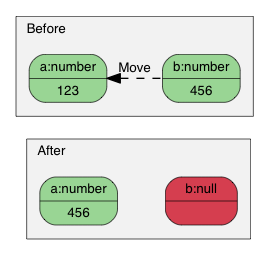
为什么?优势是 性能。固定大小类型(Number、True、False、Null)复制快且简单,但可变大小类型(String、Array、Object)复制开销大。尤其是临时对象的创建和复制。
例如使用普通复制语义:
Value o(kObjectType);
{
    Value contacts(kArrayType);
    // 向 contacts 添加元素
    o.AddMember("contacts", contacts, d.GetAllocator()); // 深拷贝 contacts
    // contacts 被析构
}
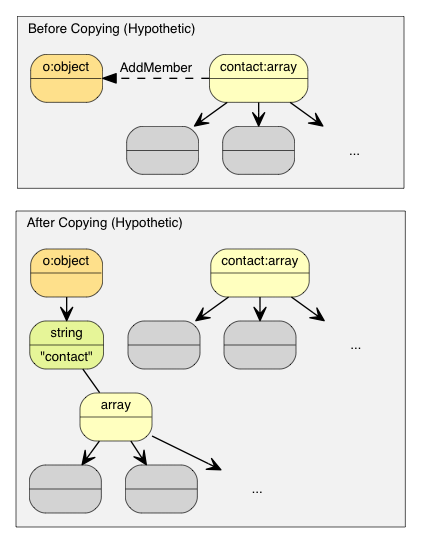
这里 o 需要分配与 contacts 相同大小的缓冲区、深拷贝,然后析构 contacts。内存分配/释放和拷贝浪费资源。
Merak 为了简单和快速,选择 移动语义。类似 std::auto_ptr 的所有权转移:仅需析构原 Value、memcpy() 源值到目标、将源值置为 Null。
使用移动语义,例子变为:
Value o(kObjectType);
{
    Value contacts(kArrayType);
    // 添加元素
    o.AddMember("contacts", contacts, d.GetAllocator()); // 仅 memcpy() 16 字节
    // contacts 变为 Null,析构开销极低
}
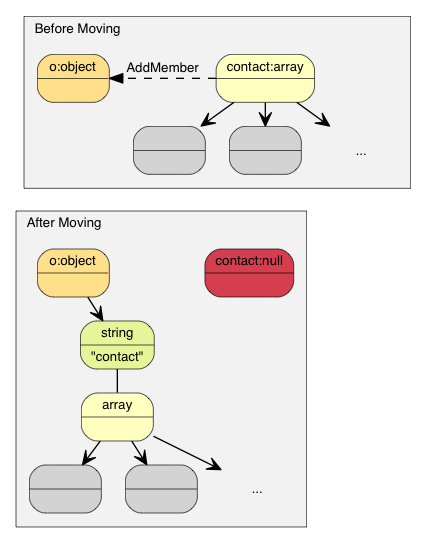
C++11 中叫做移动赋值运算符。Merak 支持 C++03,因此在赋值、AddMember()、PushBack() 等修改操作中也使用移动语义。
移动语义与临时值
构造临时 Value 并传给“移动”函数时(如 PushBack()、AddMember()),临时对象不能转换为普通引用,需要使用 Move():
Value a(kArrayType);
Document::AllocatorType& allocator = document.GetAllocator();
// a.PushBack(Value(42), allocator);       // 不可编译
a.PushBack(Value().SetInt(42), allocator); // 流式 API
a.PushBack(Value(42).Move(), allocator);   // 等价
创建字符串
Merak 提供两种字符串存储策略:
- copy-string:分配缓冲区并复制源数据。
- const-string:直接存储指针。
copy-string 总是安全的,因为拥有数据副本。const-string 适用于字符串字面量或 in-situ 解析。
操作可能分配内存时,需要传入分配器实例。示例:
Document document;
Value author;
char buffer[10];
int len = sprintf(buffer, "%s %s", "Milo", "Yip");
author.SetString(buffer, len, document.GetAllocator());
memset(buffer, 0, sizeof(buffer));
// author.GetString() 仍然是 "Milo Yip"
对于字符串字面量或安全生命周期的字符串,可使用 const-string API:
Value s;
s.SetString("merak");
s = "merak"; // 简写
若是指针,需用 StringRef 表示安全:
const char * cstr = getenv("USER");
size_t cstr_len = ...;
Value s;
s.SetString(StringRef(cstr));          // 假设生命周期安全
s = StringRef(cstr);                   // 简写
s.SetString(StringRef(cstr, cstr_len));// 处理空字符
s = StringRef(cstr, cstr_len);         // 简写
修改数组
Array 提供类似 std::vector 的接口:
Clear()Reserve(SizeType, Allocator&)Value& PushBack(Value&, Allocator&)template <typename T> Value& PushBack(T, Allocator&)Value& PopBack()ValueIterator Erase(ConstValueIterator pos)ValueIterator Erase(ConstValueIterator first, ConstValueIterator last)
示例:
Value a(kArrayType);
Document::AllocatorType& allocator = document.GetAllocator();

for (int i = 5; i <= 10; i++)
    a.PushBack(i, allocator);   // 可能 realloc

a.PushBack("Lua", allocator).PushBack("Mio", allocator); // 流式接口
非 constant 字符串或生命周期不足的字符串,需要 copy-string API:
contact.PushBack(Value("copy", document.GetAllocator()).Move(),
                 document.GetAllocator());

Value val("key", document.GetAllocator());
contact.PushBack(val, document.GetAllocator());
修改对象
对象是键值对集合(键必须是字符串)。增加成员:
Value& AddMember(Value&, Value&, Allocator&)Value& AddMember(StringRefType, Value&, Allocator&)template <typename T> Value& AddMember(StringRefType, T value, Allocator&)
示例:
Value contact(kObject);
contact.AddMember("name", "Milo", document.GetAllocator());
contact.AddMember("married", true, document.GetAllocator());
非 constant 键名或生命周期不足的字符串,用 copy-string API:
contact.AddMember(Value("copy", document.GetAllocator()).Move(),
                  Value().Move(),
                  document.GetAllocator());

Value key("key", document.GetAllocator());
Value val(42);
contact.AddMember(key, val, document.GetAllocator());
删除成员:
bool RemoveMember(const Ch* name):按名字(线性时间)bool RemoveMember(const Value& name):按 Value 名称MemberIterator RemoveMember(MemberIterator):按迭代器(常数时间,可能改变顺序)MemberIterator EraseMember(MemberIterator):按迭代器,保留顺序(线性时间)MemberIterator EraseMember(MemberIterator first, MemberIterator last):移除范围,保留顺序(线性时间)
RemoveMember(MemberIterator) 使用“移动最后一个”技术,实现常数时间。
深拷贝值
拷贝 DOM 树使用构造函数(带分配器)或 CopyFrom():
Document d;
Document::AllocatorType& a = d.GetAllocator();
Value v1("foo");

Value v2(v1, a);          // 克隆
assert(v1.IsString());

d.SetArray().PushBack(v1, a).PushBack(v2, a);
assert(v1.IsNull() && v2.IsNull());   // 已移动

v2.CopyFrom(d, a);                    // 深拷贝整个文档
v1.SetObject().AddMember("array", v2, a);
d.PushBack(v1, a);
交换值
Value a(123);
Value b("Hello");
a.Swap(b);
assert(a.IsString());
assert(b.IsInt());
交换操作是常数时间,无论 DOM 树多复杂。
接下来学习
本教程展示了如何查询和修改 DOM 树。Merak 还有其他重要概念:
- Streams:读写 JSON 的通道,可为内存或文件,也可自定义。
- Encodings:流或内存的字符编码,支持 Unicode 转换与验证。
- DOM 高级功能:就地解析、额外解析选项等(见 DOM)。
- SAX:Merak 的解析/生成基础,使用
Reader/Writer构建高性能应用,也可使用PrettyWriter美化输出。 - Performance:内部与第三方性能测试。
- Internals:Merak 内部设计与技术。
可参考 FAQ、API 文档、示例及单元测试。