Tutorial
This tutorial introduces the Document Object Model (DOM) API.
As shown in Overview, you can parse a JSON into a DOM, then easily query and modify the DOM, and finally convert it back to JSON.
Value and Document
Each JSON value is stored as a Value class, while the Document class represents the entire DOM, which stores the root Value of a DOM tree. All public types and functions of Merak are in the merak::json namespace.
Querying Values
In this section, we use code snippets from example/tutorial/tutorial.cpp.
Suppose we store a JSON in a C-style string (const char* json):
{
    "hello": "world",
    "t": true ,
    "f": false,
    "n": null,
    "i": 123,
    "pi": 3.1416,
    "a": [1, 2, 3, 4]
}
Parse it into a Document:
#include "merak/json/document.h"

using namespace merak::json;

// ...
Document document;
document.Parse(json);
Now the JSON is parsed into document as a DOM tree:
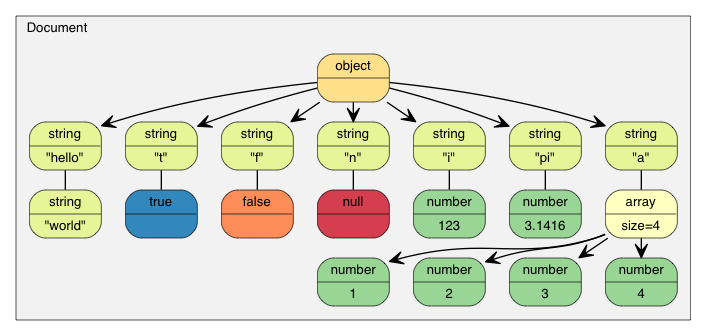
Per RFC 7159 updates, the root of a valid JSON file can be a JSON value of any type (earlier RFC 4627 only allowed Objects or Arrays as root values). In the example above, the root is an Object:
assert(document.IsObject());
Let's check if the root Object has the "hello" member. Since a Value can contain values of different types, you may need to verify its type and use the appropriate API to retrieve its value. In this case, the "hello" member is associated with a JSON String:
assert(document.HasMember("hello"));
assert(document["hello"].IsString());
printf("hello = %s\n", document["hello"].GetString());
Output:
world
JSON True/False values are represented as bool:
assert(document["t"].IsBool());
printf("t = %s\n", document["t"].GetBool() ? "true" : "false");
Output:
true
JSON Null values can be queried with IsNull():
printf("n = %s\n", document["n"].IsNull() ? "null" : "?");
Output:
null
The JSON Number type represents all numeric values. However, C++ requires more specific types:
assert(document["i"].IsNumber());

// In this case, IsUint()/IsInt64()/IsUint64() also return true
assert(document["i"].IsInt());
printf("i = %d\n", document["i"].GetInt());
// Alternative usage: (int)document["i"]

assert(document["pi"].IsNumber());
assert(document["pi"].IsDouble());
printf("pi = %g\n", document["pi"].GetDouble());
Output:
i = 123
pi = 3.1416
A JSON Array contains elements:
// Using references for consecutive access is convenient and more efficient.
const Value& a = document["a"];
assert(a.IsArray());
for (SizeType i = 0; i < a.Size(); i++) // Use SizeType instead of size_t
        printf("a[%d] = %d\n", i, a[i].GetInt());
Output:
a[0] = 1
a[1] = 2
a[2] = 3
a[3] = 4
Note that Merak does not automatically convert between JSON types. For example, calling GetInt() on a String Value is illegal—it triggers an assertion failure in debug mode and results in undefined behavior in release mode.
Details about querying each type are discussed below.
Querying Arrays
By default, SizeType is a typedef of unsigned. On most systems, an Array can store up to 2^32-1 elements.
You can access elements using integer literals like a[0], a[1], a[2].
Similar to std::vector, Arrays can also be traversed using iterators (in addition to indexes):
for (Value::ConstValueIterator itr = a.Begin(); itr != a.End(); ++itr)
    printf("%d ", itr->GetInt());
Additional familiar query functions:
SizeType Capacity() constbool Empty() const
Range-based for loops (New in v1.1.0)
When using C++11 features, you can traverse all elements in an Array with a range-based for loop:
for (auto& v : a.GetArray())
    printf("%d ", v.GetInt());
Querying Objects
Similar to Arrays, you can use iterators to access all Object members:
static const char* kTypeNames[] =
    { "Null", "False", "True", "Object", "Array", "String", "Number" };

for (Value::ConstMemberIterator itr = document.MemberBegin();
    itr != document.MemberEnd(); ++itr)
{
    printf("Type of member %s is %s\n",
        itr->name.GetString(), kTypeNames[itr->value.GetType()]);
}
Output:
Type of member hello is String
Type of member t is True
Type of member f is False
Type of member n is Null
Type of member i is Number
Type of member pi is Number
Type of member a is Array
Note that operator[](const char*) triggers an assertion failure if the member is not found.
If you are unsure whether a member exists, check with HasMember() before calling operator[](const char*). However, this causes two lookups. A better approach is to use FindMember(), which checks for existence and returns the Value in one operation:
Value::ConstMemberIterator itr = document.FindMember("hello");
if (itr != document.MemberEnd())
    printf("%s\n", itr->value.GetString());
Range-based for loops (New in v1.1.0)
When using C++11 features, you can traverse all members in an Object with a range-based for loop:
for (auto& m : document.GetObject())
    printf("Type of member %s is %s\n",
        m.name.GetString(), kTypeNames[m.value.GetType()]);
Querying Numbers
JSON provides only one numeric type—Number (which can be integer or real). RFC 4627 specifies that the range of numbers is determined by the parser.
Since C++ offers multiple integer and floating-point types, the DOM attempts to provide the widest range and optimal performance.
When parsing a Number, it is stored in the DOM as one of the following types:
| Type | Description |
|---|---|
unsigned | 32-bit unsigned integer |
int | 32-bit signed integer |
uint64_t | 64-bit unsigned integer |
int64_t | 64-bit signed integer |
double | 64-bit double-precision floating-point number |
When querying a Number, you can check if it can be extracted as the target type:
| Check | Extraction |
|---|---|
bool IsNumber() | N/A |
bool IsUint() | unsigned GetUint() |
bool IsInt() | int GetInt() |
bool IsUint64() | uint64_t GetUint64() |
bool IsInt64() | int64_t GetInt64() |
bool IsDouble() | double GetDouble() |
Note that an integer can be extracted as multiple types without conversion. For example, if a Value named x contains 123, then x.IsInt() == x.IsUint() == x.IsInt64() == x.IsUint64() == true. However, if a Value named y contains -3000000000, only x.IsInt64() == true.
When extracting a Number type, GetDouble() converts the internal integer representation to double. Note that int and unsigned can be safely converted to double, but int64_t and uint64_t may lose precision (since double has only 52 mantissa bits).
Querying Strings
In addition to GetString(), the Value class provides GetStringLength(). Here's why:
Per RFC 4627, JSON Strings can contain the Unicode character U+0000 (represented as "\u0000" in JSON). The problem is that C/C++ typically uses null-terminated strings, which treat \0 as the terminator.
To comply with RFC 4627, Merak supports Strings containing U+0000. If you need to handle such Strings, use GetStringLength() to get the correct length.
For example, after parsing the following JSON into Document d:
{ "s" : "a\u0000b" }
The correct length of "a\u0000b" is 3, but strlen() returns 1.
GetStringLength() also improves performance, as you may need to call strlen() to allocate buffers.
Additionally, std::string supports this constructor:
string(const char* s, size_t count);
This constructor accepts the string length as a parameter. It supports storing null characters and typically offers better performance.
Comparing Two Values
You can use == and != to compare two Values. Two Values are considered equal if and only if their types and contents are identical. You can also compare a Value with its native type value. Here's an example:
if (document["hello"] == document["n"]) /*...*/;    // Compare two values
if (document["hello"] == "world") /*...*/;          // Compare with string literal
if (document["i"] != 123) /*...*/;                  // Compare with integer
if (document["pi"] != 3.14) /*...*/;                // Compare with double
Arrays/Objects are compared by their elements/members in order. They are equal if and only if their entire subtrees are identical.
Note that currently, if an Object contains duplicate-named members, it will always return false when compared to any Object.
Creating/Modifying Values
There are multiple ways to create values. Once a DOM tree is created or modified, you can use Writer to save it back to JSON.
Changing Value Type
When creating a Value or Document with the default constructor, its type is Null. To change the type, call SetXXX() or use the assignment operator—for example:
Document d; // Null
d.SetObject();

Value v;    // Null
v.SetInt(10);
v = 10;     // Shorthand (equivalent to the line above)
Overloaded Constructors
Several types also have overloaded constructors:
Value b(true);    // Calls Value(bool)
Value i(-123);    // Calls Value(int)
Value u(123u);    // Calls Value(unsigned)
Value d(1.5);     // Calls Value(double)
To create an empty Object or Array, use SetObject()/SetArray() after the default constructor, or use Value(Type) directly:
Value o(kObjectType);
Value a(kArrayType);
Move Semantics
A very special design decision in Merak is that Value assignment does not copy the source Value to the destination Value—it moves the source Value to the destination Value. For example:
Value a(123);
Value b(456);
b = a;         // a becomes Null, b becomes the number 123.
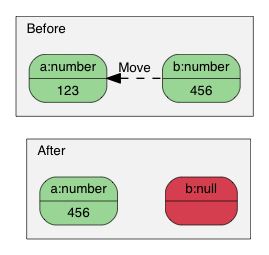
Why this design? What are the advantages of this semantics?
The simplest answer is performance. For fixed-size JSON types (Number, True, False, Null), copying is fast and simple. However, for variable-size JSON types (String, Array, Object), copying incurs significant overhead—often unnoticed. This is especially true when creating temporary Objects, copying them to another variable, then destructing them.
For example, with normal copy semantics:
Value o(kObjectType);
{
    Value contacts(kArrayType);
    // Add elements to the contacts array.
    // ...
    o.AddMember("contacts", contacts, d.GetAllocator());  // Deep copy of contacts (may involve heavy memory allocation)
    // Destruct contacts.
}
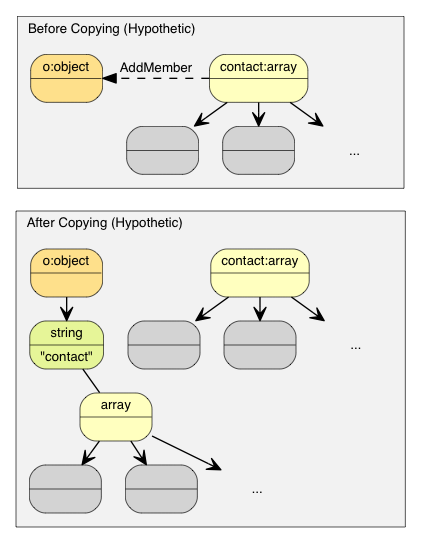
The o Object would need to allocate a buffer of the same size as contacts, perform a deep copy of contacts, and finally destruct contacts. This results in unnecessary memory allocations/frees and memory copies.
Solutions to avoid physical copying include reference counting and garbage collection (GC).
To keep Merak simple and fast, we chose move semantics for assignment. This approach is similar to std::auto_ptr—transferring ownership during assignment. Moving is much faster and simpler: it only requires destructing the original Value, memcpy()-ing the source to the target, and finally setting the source to the Null type.
With move semantics, the example above becomes:
Value o(kObjectType);
{
    Value contacts(kArrayType);
    // Adding elements to contacts array.
    o.AddMember("contacts", contacts, d.GetAllocator());  // Only memcpy() contacts itself to the new member's Value (16 bytes)
    // contacts becomes Null here. Its destruction is trivial.
}
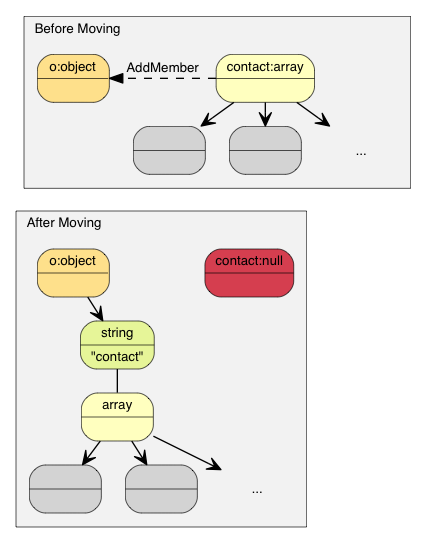
In C++11, this is called the move assignment operator. Since Merak supports C++03, it uses move semantics for assignment operations, as well as for modifying functions like AddMember() and PushBack().
Move Semantics and Temporary Values
Sometimes you want to construct a Value directly and pass it to a "move" function (e.g., PushBack(), AddMember()). Since temporary objects cannot be converted to regular Value references, we added a convenient Move() function:
Value a(kArrayType);
Document::AllocatorType& allocator = document.GetAllocator();
// a.PushBack(Value(42), allocator);       // Does not compile
a.PushBack(Value().SetInt(42), allocator); // Fluent API
a.PushBack(Value(42).Move(), allocator);   // Equivalent to the line above
Creating Strings
Merak provides two storage strategies for Strings:
- copy-string: Allocates a buffer and copies the source data into it.
- const-string: Simply stores a pointer to the string.
Copy-strings are always safe because they own a clone of the data. Const-strings are useful for storing string literals and in in-situ parsing (discussed in the DOM section).
To allow custom memory allocation, Merak requires users to pass an allocator instance as an API parameter whenever an operation may need memory allocation. This design avoids storing a pointer to an allocator (or document) in each Value.
Thus, when assigning a copy-string, call the overloaded SetString() with an allocator:
Document document;
Value author;
char buffer[10];
int len = sprintf(buffer, "%s %s", "Milo", "Yip"); // Dynamically created string.
author.SetString(buffer, len, document.GetAllocator());
memset(buffer, 0, sizeof(buffer));
// author.GetString() still contains "Milo Yip" after clearing buffer
In this example, we use the allocator from the Document instance—a common idiom when using Merak. However, you can use other allocator instances.
Additionally, the SetString() above requires a length parameter. This API handles strings containing null characters. Another overloaded SetString() without a length parameter assumes the input is null-terminated and calls a strlen()-like function to get the length.
Finally, for string literals or strings with a safe lifetime, use the const-string version of SetString() (no allocator parameter). For string literals (or constant character arrays), simply pass the literal—safe and efficient:
Value s;
s.SetString("merak");    // Can contain null characters; length deduced at compile time
s = "merak";             // Shorthand (equivalent to the line above)
For character pointers, Merak requires a marker to indicate that it is safe not to copy. Use the StringRef function:
const char * cstr = getenv("USER");
size_t cstr_len = ...;                 // If length is available
Value s;
// s.SetString(cstr);                  // Does not compile
s.SetString(StringRef(cstr));          // Allowed (assumes safe lifetime and null-terminated)
s = StringRef(cstr);                   // Shorthand (equivalent to the line above)
s.SetString(StringRef(cstr, cstr_len));// Faster; handles null characters
s = StringRef(cstr, cstr_len);         // Shorthand (equivalent to the line above)
Modifying Arrays
Array-type Values provide an API similar to std::vector:
Clear()Reserve(SizeType, Allocator&)Value& PushBack(Value&, Allocator&)template <typename T> GenericValue& PushBack(T, Allocator&)Value& PopBack()ValueIterator Erase(ConstValueIterator pos)ValueIterator Erase(ConstValueIterator first, ConstValueIterator last)
Note that Reserve(...) and PushBack(...) may allocate memory for array elements and thus require an allocator.
Here's an example of PushBack():
Value a(kArrayType);
Document::AllocatorType& allocator = document.GetAllocator();

for (int i = 5; i <= 10; i++)
    a.PushBack(i, allocator);   // May call realloc()—allocator required

// Fluent interface
a.PushBack("Lua", allocator).PushBack("Mio", allocator);
Unlike STL, PushBack()/PopBack() return a reference to the Array itself (known as a fluent interface).
If you want to add a non-constant string or a string with an insufficient lifetime (see Creating Strings) to an Array, use the copy-string API to create the String. To avoid intermediate variables, use a temporary value in place:
// In-place Value parameter
contact.PushBack(Value("copy", document.GetAllocator()).Move(), // copy string
                 document.GetAllocator());

// Explicit Value parameter
Value val("key", document.GetAllocator()); // copy string
contact.PushBack(val, document.GetAllocator());
Modifying Objects
Objects are collections of key-value pairs (each key must be a String). To modify an Object, add or remove members. The following APIs add members:
Value& AddMember(Value&, Value&, Allocator& allocator)Value& AddMember(StringRefType, Value&, Allocator&)template <typename T> Value& AddMember(StringRefType, T value, Allocator&)
Here's an example:
Value contact(kObject);
contact.AddMember("name", "Milo", document.GetAllocator());
contact.AddMember("married", true, document.GetAllocator());
Overloads using StringRefType for the name parameter are similar to the string SetString interface. These overloads avoid copying the name string—useful since JSON objects often use constant key names.
If you need to create a key name from a non-constant string or a string with an insufficient lifetime (see Creating Strings), use the copy-string API. To avoid intermediate variables, use a temporary value in place:
// In-place Value parameter
contact.AddMember(Value("copy", document.GetAllocator()).Move(), // copy string
                  Value().Move(),                                // null value
                  document.GetAllocator());

// Explicit parameters
Value key("key", document.GetAllocator()); // copy string name
Value val(42);                             // some Value
contact.AddMember(key, val, document.GetAllocator());
There are several options to remove members:
bool RemoveMember(const Ch* name): Remove a member by name (linear time complexity).bool RemoveMember(const Value& name): Same as above, butnameis a Value.MemberIterator RemoveMember(MemberIterator): Remove a member by iterator (constant time complexity).MemberIterator EraseMember(MemberIterator): Similar to above but preserves member order (linear time complexity).MemberIterator EraseMember(MemberIterator first, MemberIterator last): Remove a range of members (preserves order; linear time complexity).
MemberIterator RemoveMember(MemberIterator) uses a "move last" technique to achieve constant time complexity: it destructs the member at the iterator position, then moves the last member to the iterator position. Thus, member order is changed.
Deep Copying Values
If you need to copy a DOM tree, use two APIs for deep copying: the constructor with an allocator and CopyFrom():
Document d;
Document::AllocatorType& a = d.GetAllocator();
Value v1("foo");
// Value v2(v1); // Not allowed

Value v2(v1, a);                      // Create a clone
assert(v1.IsString());                // v1 remains unchanged
d.SetArray().PushBack(v1, a).PushBack(v2, a);
assert(v1.IsNull() && v2.IsNull());   // Both are moved into d

v2.CopyFrom(d, a);                    // Copy entire document to v2
assert(d.IsArray() && d.Size() == 2); // d remains unchanged
v1.SetObject().AddMember("array", v2, a);
d.PushBack(v1, a);
Swapping Values
Merak also provides Swap():
Value a(123);
Value b("Hello");
a.Swap(b);
assert(a.IsString());
assert(b.IsInt());
Swapping is fast (constant time) regardless of how complex the DOM trees are.
What's Next
This tutorial demonstrates how to query and modify DOM trees. Merak has several other important concepts:
- Streams are channels for reading/writing JSON. Streams can be in-memory strings, file streams, etc. Users can also define custom streams.
- Encodings define character encodings used in streams or memory. Merak also provides internal Unicode conversion and validation.
- Basic DOM functionality is introduced in this tutorial. Advanced features include in-situ parsing, additional parsing options, and advanced usage (see DOM).
- SAX is the foundation of Merak's parsing/generation capabilities. Learn to use
Reader/Writerto build higher-performance applications. You can also usePrettyWriterto format JSON. - Performance shows internal and third-party performance tests.
- Internals covers Merak's internal design and techniques.
You can also refer to the FAQ, API documentation, examples, and unit tests.