Overlay ports
Usually, kmpkg ports are obtained from registries. It is very likely that most of the ports you install come from the official kmpkg registry at https://github.com/kumose/kmpkg. kmpkg lets you install ports available to you via the file system, we call these ports, overlay ports.
An overlay port can act as a drop-in replacement for an existing port or as a new port that is otherwise not available in a registry. While resolving package names, overlay ports take priority.
Overlay ports are evaluated in the following order:
- The directory specified in the command-line via
--overlay-ports, or named subdirectories if that directory has noCONTROLorkmpkg.jsonfile. - The directory specified in a
kmpkg-configuration.jsonfile viaoverlay-ports, or named subdirectories if that directory has noCONTROLorkmpkg.jsonfile. - The directory specified by
KMPKG_OVERLAY_PORTSenvironment variable entries, or named subdirectories if that directory has noCONTROLorkmpkg.jsonfile.
When resolving port names, the first location that contains a matching overlay port is selected.
Using an overlay port
If an overlay port is specified, first, kmpkg attempts to load that directory as a port. If that succeeds, the directory itself is itself treated as a port, and the name of the overlay is derived from the CONTROL or kmpkg.json file. Otherwise, subdirectories with the overlay port name are considered.
Valid ports contain portfile.cmake, and either kmpkg.json or CONTROL.
For example, consider the following directory structure:
x/kmpkg.json, the"name"field is set to"a".x/portfile.cmake, the associated build instructions fora.x/b/kmpkg.json, the"name"field is set to"b".x/b/portfile.cmake, the associated build instructions forb.y/c/kmpkg.json, the"name"field is set to"c".y/c/portfile.cmake, the associated build instructions forc.y/d/kmpkg.json, the"name"field is set to"d".y/d/portfile.cmake, the associated build instructions ford.
kmpkg will consider the following ports given the following settings:
--overlay-ports=x: There is one port in this overlay,a. The name is derived fromkmpkg.json. The subdirectorybis not considered.--overlay-ports=x/b: There is one port in this overlay,b. The name is derived fromkmpkg.json.--overlay-ports=y: There are two ports in this overlay,candd. Their names are derived from the subdirectories ofy, and the names declared in theirkmpkg.jsonmust match, or an error will be generated if kmpkg is asked to considercord.
You can add to the overlay port configuration in several ways:
- Command-line: Add one or more
--overlay-ports=<directory>options to the command-line. - Manifest: Populate the
"overlay-ports"array inkmpkg-configuration.json. - Environmental variable: Set
KMPKG_OVERLAY_PORTSto a path character delimited list.
Example: Overlay Ports Example
Given this directory structure:
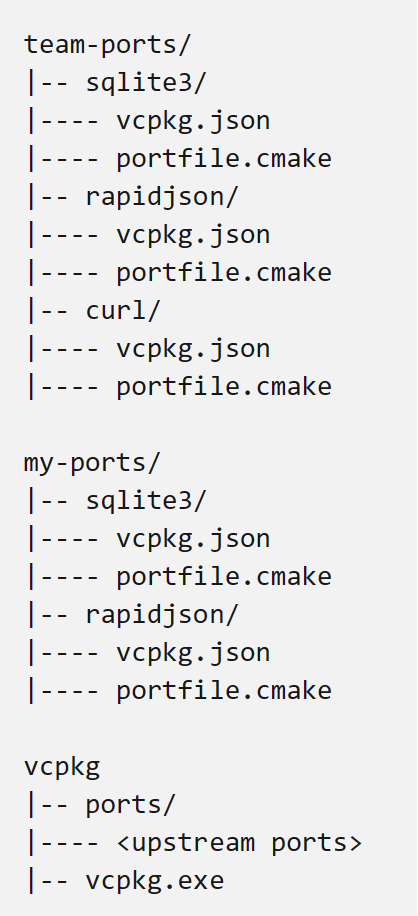
Run:
kmpkg install sqlite3 --overlay-ports=my-ports --overlay-ports=team-ports
To install:
sqlite3frommy-ports
Run:
kmpkg install sqlite3 rapidjson curl \
    --overlay-ports=my-ports/rapidjson \
    --overlay-ports=kmpkg/ports/curl \
    --overlay-ports=team-ports
To install:
sqlite3fromteam-portsrapidjsonfrommy-portscurlfromkmpkg/ports
Example: Using overlay ports to use a system package manager dependency
To use a system package manager dependency over a kmpkg one, refer to our blog post.