DOM
The Document Object Model (DOM) is an in-memory JSON representation designed for querying and manipulation. We introduced the basic usage of DOM in the Tutorial; this section will cover additional details and advanced usage.
[TOC]
Template
In the tutorial, we used the Value and Document types. Similar to std::string, these types are actually typedefs of two template classes:
namespace merak::json {

template <typename Encoding, typename Allocator = MemoryPoolAllocator<> >
class GenericValue {
    // ...
};

template <typename Encoding, typename Allocator = MemoryPoolAllocator<> >
class GenericDocument : public GenericValue<Encoding, Allocator> {
    // ...
};

typedef GenericValue<UTF8<> > Value;
typedef GenericDocument<UTF8<> > Document;

} // namespace merak::json
Users can customize these template parameters.
Encoding
The Encoding parameter specifies the encoding used for JSON Strings in memory. Valid options are UTF8, UTF16, and UTF32. Note that these three types are also template classes. UTF8<> is equivalent to UTF8<char>, meaning it uses char to store strings. For more details, refer to Encoding.
Here is an example: suppose a Windows application needs to query localized strings stored in JSON. Unicode-enabled functions in Windows use UTF-16 (wide character) encoding. Regardless of the encoding used in the JSON file, we can store the strings in memory as UTF-16.
using namespace merak::json;

typedef GenericDocument<UTF16<> > WDocument;
typedef GenericValue<UTF16<> > WValue;

FILE* fp = fopen("localization.json", "rb"); // Use "r" for non-Windows platforms

char readBuffer[256];
FileReadStream bis(fp, readBuffer, sizeof(readBuffer));

AutoUTFInputStream<unsigned, FileReadStream> eis(bis);  // Wrap bis into eis

WDocument d;
d.ParseStream<0, AutoUTF<unsigned> >(eis);

const WValue locale(L"ja"); // Japanese

MessageBoxW(hWnd, d[locale].GetString(), L"Test", MB_OK);
Allocator
Allocator defines which allocation class is used when Document/Value allocates or frees memory. A Document owns or references an Allocator instance. To save memory, Value does not have this instance.
The default allocator for GenericDocument is MemoryPoolAllocator. This allocator actually allocates memory sequentially and cannot free individual blocks. When parsing a JSON to generate a DOM, this allocator is highly suitable.
Merak also provides another allocator, CrtAllocator (CRT stands for C RunTime library). This allocator simply uses the standard malloc()/realloc()/free(). It is more suitable when numerous add/remove operations are required. However, this allocator is far less efficient than MemoryPoolAllocator.
Parsing
Document provides several parsing functions. Function (1) below is the fundamental one, and the others are helper functions that call (1):
using namespace merak::json;

// (1) Fundamental
template <unsigned parseFlags, typename SourceEncoding, typename InputStream>
GenericDocument& GenericDocument::ParseStream(InputStream& is);

// (2) Use encoding of the stream
template <unsigned parseFlags, typename InputStream>
GenericDocument& GenericDocument::ParseStream(InputStream& is);

// (3) Use default flags
template <typename InputStream>
GenericDocument& GenericDocument::ParseStream(InputStream& is);

// (4) In situ parsing
template <unsigned parseFlags>
GenericDocument& GenericDocument::ParseInsitu(Ch* str);

// (5) In situ parsing with default flags
GenericDocument& GenericDocument::ParseInsitu(Ch* str);

// (6) Normal parsing of a string
template <unsigned parseFlags, typename SourceEncoding>
GenericDocument& GenericDocument::Parse(const Ch* str);

// (7) Normal parsing of a string using Document's encoding
template <unsigned parseFlags>
GenericDocument& GenericDocument::Parse(const Ch* str);

// (8) Normal parsing of a string with default flags
GenericDocument& GenericDocument::Parse(const Ch* str);
Examples in the Tutorial use (8) for normal string parsing, while examples in Streams use the first three functions. We will introduce in situ parsing later.
parseFlags is a combination of the following bit flags:
| Parse Bit Flag | Meaning |
|---|---|
kParseNoFlags | No flags set. |
kParseDefaultFlags | Default parsing options. Equivalent to the macro RAPIDJSON_PARSE_DEFAULT_FLAGS, which is defined as kParseNoFlags. |
kParseInsituFlag | In situ (destructive) parsing. |
kParseValidateEncodingFlag | Validate the encoding of JSON strings. |
kParseIterativeFlag | Iterative parsing (constant stack space complexity). |
kParseStopWhenDoneFlag | Stop processing the remaining stream after parsing a complete JSON root node. When this flag is set, the parser will not generate the kParseErrorDocumentRootNotSingular error. This flag can be used to parse multiple JSONs from the same stream. |
kParseFullPrecisionFlag | Parse numbers with full precision (slower). If not set, normal precision (faster) is used, with a maximum error of 3 ULP. |
kParseCommentsFlag | Allow single-line // ... and multi-line /* ... */ comments (relaxed JSON syntax). |
kParseNumbersAsStringsFlag | Parse numeric types as strings. |
kParseTrailingCommasFlag | Allow trailing commas before the end of objects and arrays (relaxed JSON syntax). |
kParseNanAndInfFlag | Allow NaN, Inf, Infinity, -Inf, and -Infinity as double values (relaxed JSON syntax). |
kParseEscapedApostropheFlag | Allow escaped apostrophes \' in strings (relaxed JSON syntax). |
Since non-type template parameters are used instead of function parameters, the C++ compiler can generate code for individual combinations to improve performance and reduce code size (when only a single specialization is used). The downside is that flags must be determined at compile time.
The SourceEncoding parameter defines the encoding used by the stream, which may differ from the Encoding of the Document. For details, refer to the Transcoding and Validation section.
Additionally, InputStream is the type of the input stream.
Parse Error
If parsing completes successfully, the Document will contain the parsing result. If an error occurs during parsing, the original DOM remains unchanged. You can use bool HasParseError(), ParseErrorCode GetParseError(), and size_t GetErrorOffset() to retrieve the parsing error status.
| Parse Error Code | Description |
|---|---|
kParseErrorNone | No error. |
kParseErrorDocumentEmpty | The document is empty. |
kParseErrorDocumentRootNotSingular | No additional values are allowed after the document root. |
kParseErrorValueInvalid | Invalid value. |
kParseErrorObjectMissName | Missing name for Object member. |
kParseErrorObjectMissColon | Missing colon after Object member name. |
kParseErrorObjectMissCommaOrCurlyBracket | Missing comma or } after Object member. |
kParseErrorArrayMissCommaOrSquareBracket | Missing comma or ] after Array element. |
kParseErrorStringUnicodeEscapeInvalidHex | Invalid hexadecimal digits after \\u escape in String. |
kParseErrorStringUnicodeSurrogateInvalid | Invalid surrogate pair in String. |
kParseErrorStringEscapeInvalid | Invalid escape character in String. |
kParseErrorStringMissQuotationMark | Missing closing quotation mark for String. |
kParseErrorStringInvalidEncoding | Invalid encoding in String. |
kParseErrorNumberTooBig | Numeric value is too large to be stored in a double. |
kParseErrorNumberMissFraction | Missing fractional part for Number. |
kParseErrorNumberMissExponent | Missing exponent for Number. |
The error offset is defined as the number of characters from the start of the stream to the error location. Currently, Merak does not record error line numbers.
To retrieve error messages, Merak provides English error messages in merak/json/error/en.h. Users can modify this file for other language environments or use a custom localization system.
Here is an example of handling errors:
#include "merak/json/document.h"
#include "merak/json/error/en.h"

// ...
Document d;
if (d.Parse(json).HasParseError()) {
    fprintf(stderr, "\nError(offset %u): %s\n",
        (unsigned)d.GetErrorOffset(),
        GetParseError_En(d.GetParseErrorCode()));
    // ...
}
In Situ Parsing
According to Wikipedia:
In situ ... is a Latin phrase that translates literally to "on site" or "in position". It means "locally", "on site", "on the premises" or "in place" to describe an event where it takes place, and is used in many different contexts. ... (In computer science) An algorithm is said to be an in situ algorithm, or in-place algorithm, if the extra amount of memory required to execute the algorithm is O(1), that is, does not exceed a constant no matter how large the input. For example, heapsort is an in situ sorting algorithm.
In the normal parsing process, decoding JSON strings and copying them to other buffers incurs significant overhead. In situ parsing decodes these JSON strings directly in their original storage location. This is feasible because the length of the decoded string is always shorter than or equal to the original string stored in JSON. In this context, decoding a JSON string refers to processing escape characters (e.g., "\n", "\u1234"), and adding a null terminator ('\0') at the end of the string.
The diagrams below compare normal parsing and in situ parsing. JSON string values contain pointers to the decoded strings.
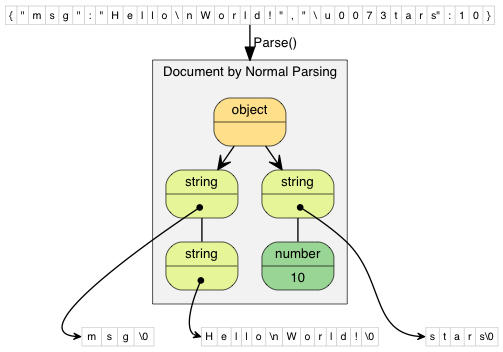
In normal parsing, the decoded string is copied to a newly allocated buffer. "\\n" (2 characters) is decoded to "\n" (1 character), and "\\u0073" (6 characters) is decoded to "s" (1 character).
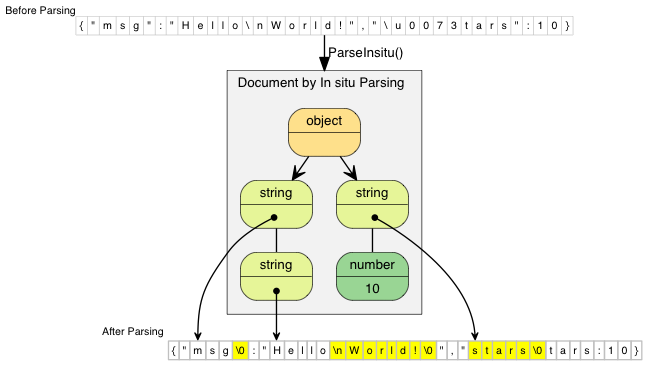
In situ parsing modifies the original JSON directly. The updated characters are highlighted in the diagram. If a JSON string contains no escape characters (e.g., "msg"), the parsing process simply replaces the closing double quote with a null character.
Since in situ parsing modifies the input, its parsing API requires char* instead of const char*:
// Read the entire file into a buffer
FILE* fp = fopen("test.json", "r");
fseek(fp, 0, SEEK_END);
size_t filesize = (size_t)ftell(fp);
fseek(fp, 0, SEEK_SET);
char* buffer = (char*)malloc(filesize + 1);
size_t readLength = fread(buffer, 1, filesize, fp);
buffer[readLength] = '\0';
fclose(fp);

// Parse the buffer in situ into d; the buffer content will be modified
Document d;
d.ParseInsitu(buffer);

// Query and modify the DOM here...

free(buffer);
// Note: At this point, d may contain dangling pointers to the freed buffer
JSON strings are marked with a const-string flag, but they may not be truly "constant". Their lifetime depends on the buffer storing the JSON.
In situ parsing minimizes allocation overhead and memory copying. This typically improves cache coherence, a critical performance factor for modern computers.
In situ parsing has the following limitations:
- The entire JSON must be stored in memory.
- The source encoding of the stream must match the target encoding of the document.
- The buffer must be retained until the document is no longer used.
- If the DOM needs to be used long-term after parsing and contains only a small number of JSON strings, retaining the buffer may result in memory waste.
In situ parsing is most suitable for short-lived, disposable JSON. In practice, these scenarios are very common—for example, deserializing JSON to C++ objects, processing web requests represented in JSON, etc.
Transcoding and Validation
Merak natively supports conversion between different Unicode formats (officially called UCS Transformation Formats). During DOM parsing, the source encoding of the stream can differ from the encoding of the DOM. For example, the source stream may contain UTF-8 JSON, while the DOM uses UTF-16 encoding. An example is provided in the EncodedInputStream section.
Transcoding can also be used when outputting a JSON from the DOM to an output stream. An example is provided in the EncodedOutputStream section.
During transcoding, the source string is decoded into Unicode code points, which are then encoded into the target format. During decoding, it validates whether the byte sequence of the source string is legal. If an illegal sequence is encountered, the parser stops and returns the kParseErrorStringInvalidEncoding error.
When the source encoding matches the DOM's encoding, the parser does not validate the sequence by default. Users can enable kParseValidateEncodingFlag to force validation.
Techniques
This section discusses some usage techniques for the DOM API.
Using DOM as a SAX Event Publisher
In Merak, generating JSON from a DOM using Writer may seem counterintuitive:
// ...
Writer<StringBuffer> writer(buffer);
d.Accept(writer);
In fact, Value::Accept() is responsible for publishing SAX events related to the value to a handler. This design decouples Value and Writer: Value can generate SAX events, and Writer can process these events.
Users can create custom handlers to convert the DOM to other formats—for example, a handler that converts the DOM to XML.
For more information about SAX events and handlers, refer to SAX.
User-Provided Buffers
Many applications may need to minimize memory allocations.
MemoryPoolAllocator can help with this, as it allows users to provide a buffer. This buffer may be placed on the program stack or as a statically allocated "scratch buffer" (a static/global array) for storing temporary data.
MemoryPoolAllocator first uses the user-provided buffer to fulfill allocation requests. When the user buffer is exhausted, it allocates a block of memory from the underlying allocator (default: CrtAllocator).
Here is an example using stack memory: the first allocator is used to store values, and the second for temporary buffering during parsing:
typedef GenericDocument<UTF8<>, MemoryPoolAllocator<>, MemoryPoolAllocator<>> DocumentType;
char valueBuffer[4096];
char parseBuffer[1024];
MemoryPoolAllocator<> valueAllocator(valueBuffer, sizeof(valueBuffer));
MemoryPoolAllocator<> parseAllocator(parseBuffer, sizeof(parseBuffer));
DocumentType d(&valueAllocator, sizeof(parseBuffer), &parseAllocator);
d.Parse(json);
If the total allocation during parsing is less than 4096 + 1024 bytes, this code will not cause any heap memory allocations (via new or malloc()).
Users can query the current allocated memory size via MemoryPoolAllocator::Size(), allowing them to determine an appropriate size for the user-provided buffer.